
Mei Foods grew out of an unexpected pattern we noticed while building Happy Machines Company. While working on Jeto, our cross-platform bookmarking tool, we found that nearly 40% of our users were saving recipes and food-related content. That signal, combined with our own frustrations around meal planning, sparked a pivot. The bookmarking engine we'd built for Slipspaces and Jeto became the foundation for something more focused: a recipe app that could turn any saved link into structured, cookable content.

From links to recipes
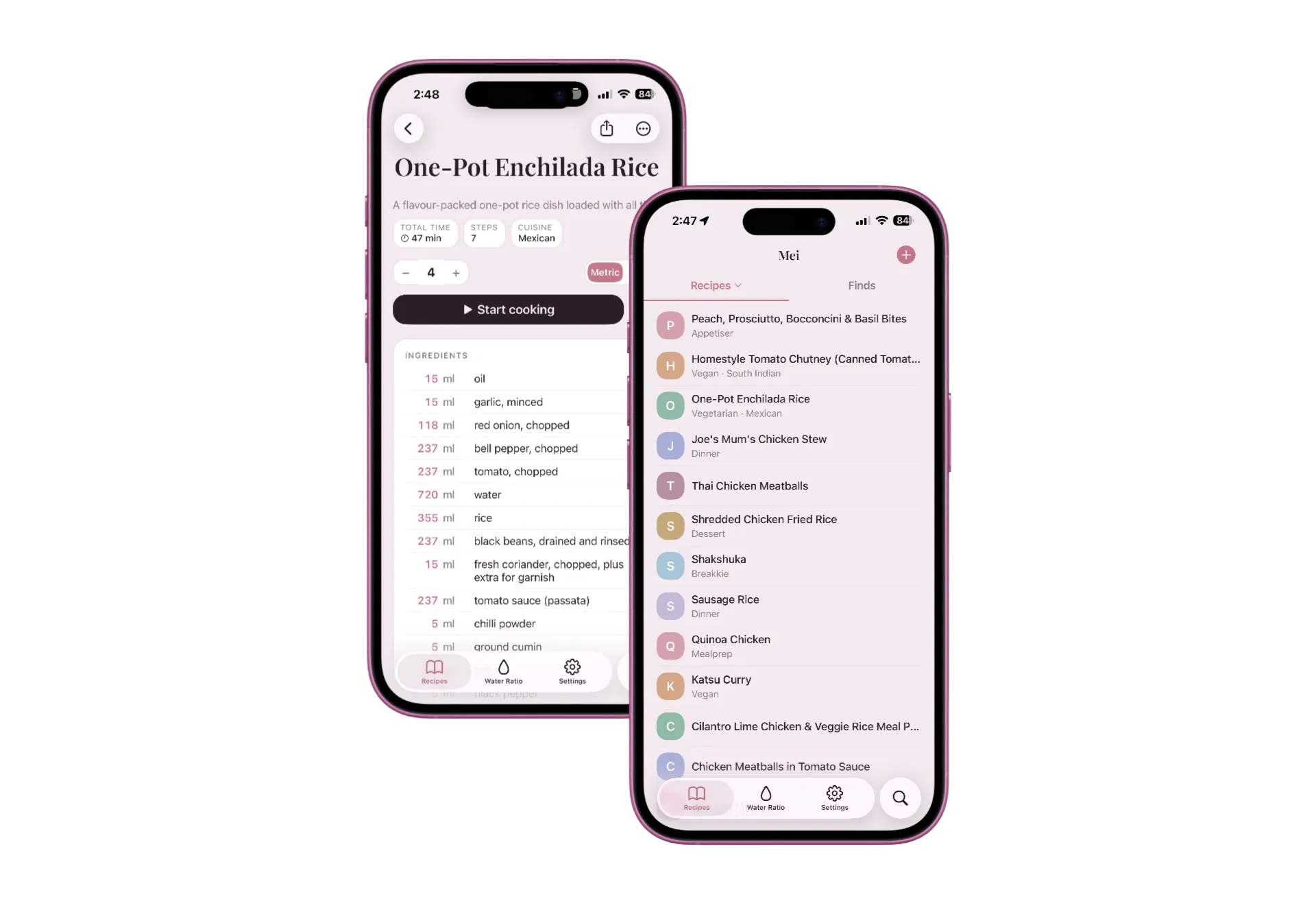
The core insight from our bookmarking work was that people don't just want to save links, they want the useful information inside them. With recipes, that means ingredients, steps, cook times, and notes, not a URL buried in a browser tab. Mei lets you share any recipe link straight into the app via a native share extension. It lands in a WIP inbox as a draft, the source title gets unfurled in the background, and from there you turn it into a clean, editable recipe card on your terms.
The data model splits this into two stages: a lightweight WIP draft for anything you've saved but not processed yet, and a structured recipe (ingredients, steps, tags, source URL) once you've converted it into something cookable. The split keeps the inbox fast (a share shouldn't block on a fetch) and lets the conversion happen on your terms, in the app or via an agent through MCP.
Mei is one TypeScript codebase that ships as three surfaces: a native iOS app, a web app at cooks.rkarthik.co, and an MCP endpoint for AI agents, all from the same Expo Router project. The iOS app rides on React Native's New Architecture (0.85): JSI gives the JavaScript side direct, synchronous access to native modules through a shared C++ layer, Fabric drives concurrent rendering, and TurboModules are lazily loaded and type-safe at compile time via Codegen. The web build serves the same React component tree through react-native-web, so the offline cache, sync layer, and UI all ship from one source. The previous Next.js PWA is preserved on a backup/nextjs-pwa branch. Expo earned the keys to the front door once the share extension, native sheets, and SF Symbols started to matter.
Built with MCP tools
Mei was the project where I went deep on MCP (Model Context Protocol) and agent-driven development. The app exposes a remote MCP endpoint via a Cloudflare Worker, which means Claude, whether in Claude Code, Claude Desktop, or the web, can interact directly with the recipe database. You can ask it to list or search recipes, add new ones, convert WIP drafts into structured recipes, or pull a specific one by ID, and it operates on real data through the MCP layer rather than generating answers from training data.
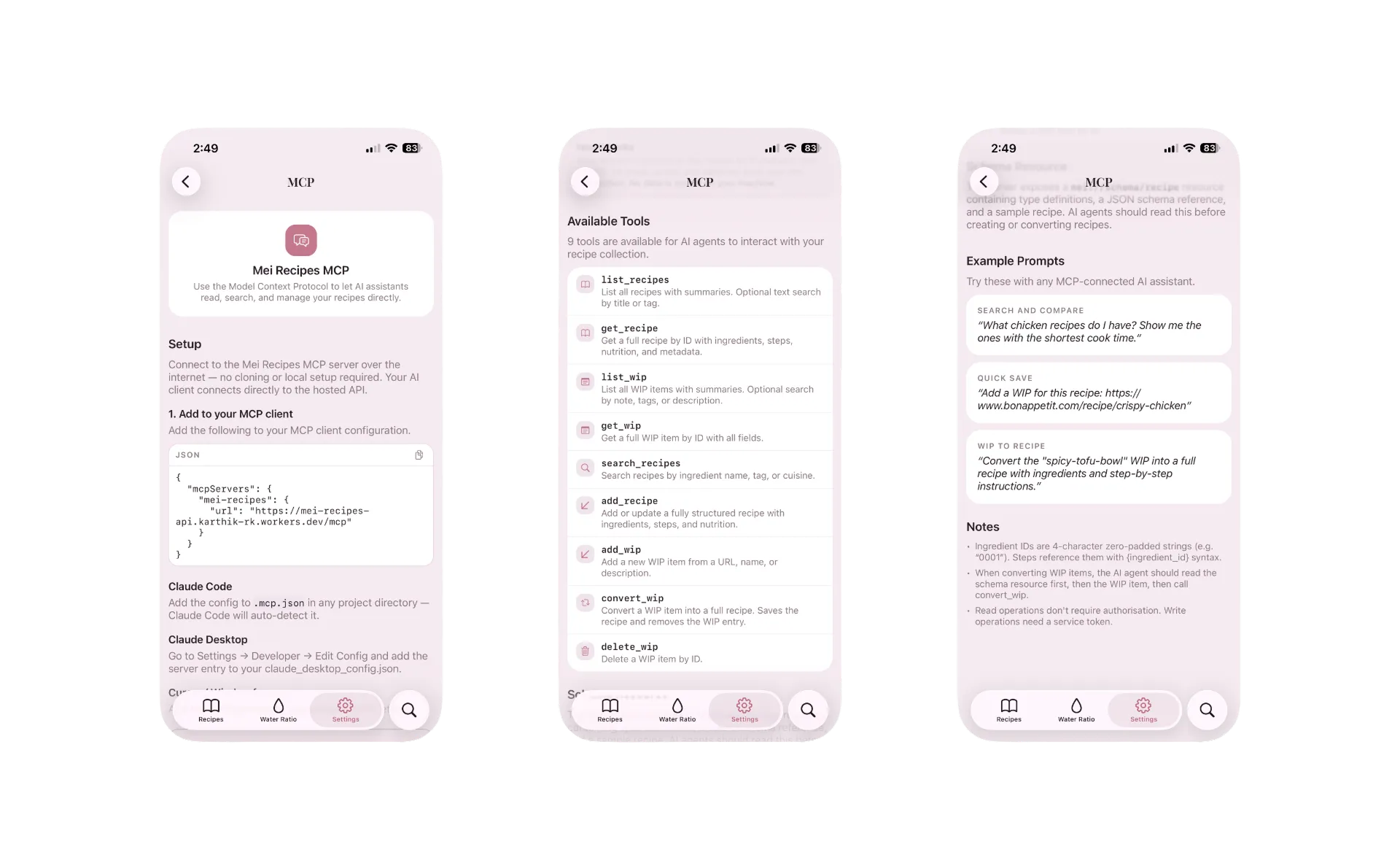
The development itself was heavily agent-assisted. The entire Cloudflare D1 backend (Drizzle ORM schema, REST API routes, the OAuth provider for Claude Web, and the MCP endpoint) was built collaboratively with Claude Code. The CLAUDE.md file for this project runs deep: architecture rules, design tokens, React Native conventions, native build gotchas, and the dozens of patches and workarounds that accumulated over months of iterative development. It became the project's institutional memory, letting each new session pick up exactly where the last one left off.
Pastel design system
The visual direction was deliberate. I wanted something that felt warm and approachable, not the usual stark white recipe app or the overly playful food illustrations. The design system is built around a dusty rose palette with desaturated pastels: soft sage for success states, periwinkle for informational accents, and a warm dark mode that uses a five-blob pastel glow system instead of flat dark surfaces.
Design principles
Technical stack
Designing against iOS 26's Liquid Glass
iOS 26 introduced a translucent Liquid Glass material behind nav-bar backgrounds, bar-button items, and segmented controls. Beautiful in isolation, antagonistic to a curated palette. An opaque header rendered as a distinct lighter band sitting on top of the blush canvas, so headers are kept transparent and non-scrolling content gets manually offset below the bar. Custom header-right views got a glass capsule drawn behind them, stripped via hidesSharedBackground on the new unstable_headerRightItems API.
The harder loss was UISegmentedControl. On iOS 26 it draws its own glass capsule track, so backgroundColor and borderRadius are both ignored. Only tintColor takes. The unit toggle on a recipe sits flush with a white serving stepper, and there was no way to match that with the native control. So I threw it out and rebuilt the segmented control from Pressables. The stock control still ships in places where the default gray track is acceptable. Picking your battles is part of the discipline.
A scale-aware type system
NativeWind classes that work without thinking on web (text-base, leading-relaxed) don't survive the crossing to React Native. The react-native-css compiler can't resolve unitless or em line-heights on native, so multi-line text either overlaps itself or collapses to zero height (the view is there, nothing paints). Tailwind's theme text-* scale has the same problem.
The fix was to drop Tailwind's defaults on native and roll a scale-aware token system: text-display, text-title, text-heading, text-body, text-label, text-badge. Each one is calc(<px> * var(--font-size-scale)), so the in-app Font Size control (0.8–1.4) scales only text, never spacing or radii. The bare border utility hit the same class of bug from the opposite direction, defaulting to currentColor (which renders black on native), so border colour now comes through useCSSVariable instead of a class. Small price for a cross-platform stylesheet.
The agent workflow
What made this project different from Dock Tile or Spades Audio was how central the agent workflow became. It wasn't just AI-assisted coding. The MCP integration means the app itself is an agent tool. Claude can query the recipe database, search by cuisine or title, draft new recipes, and convert WIP links into structured cards. The boundary between "building the app" and "using the app through an agent" blurred in a useful way.
The development cadence was shaped by this too. Features like the sync layer, the WIP drafts inbox, and the share-extension pipeline were all designed with the MCP contract in mind. Every feature that works through the UI also works through the agent interface. No second-class API.
The journey from Slipspaces to Jeto to Mei has been filled with lessons and reminders to keep iterating, solving small problems and not worrying about scale or outcomes. I'll continue to develop Mei as agent tools get better every day. The bigger vision is to take it to real-world products and build a bridge to them.