


Microsoft released Windows 8 developer preview a few weeks back and I'm both excited and cautious! Microsoft's making both 32-bit and 64-bit builds available, this is early developer stuff, so I was expecting some bugs and incomplete features.
The reason MS is releasing this early. Probably to get ahead of all the leaked info floating around, plus it's brilliant PR timing.
Microsoft's demo videos revealed something genuinely radical, those user-configurable tiles look absolutely nothing like Win7. It's a complete interface departure from everything we know about Windows.
Fast boot times, proper touch support, familiar explorer but with an app-focused twist. The developer version includes tools like Windows SDK and Visual Studio 11 for building new experiences.
My hesitation? HDD is already bursting, and I don't fancy clearing precious space just to experience a premature OS. I'll wait for more polished impressions before diving in.
July 2012: Release Preview
Fast-forward a to now since the dev preview, and I've finally gotten my hands on the Release Preview. The developer preview was filled with install issues on both my desktop and laptop, proper frustrating that was! Even Googling didn't help. But the RP version installed perfectly on the first shot. Result! 😊
Desktop experience: where Windows 8 actually shines
On my desktop, Windows 8 is genuinely way faster than Win7, and the differences are obvious immediately. Yes, I'm talking about Metro, but first, let me mention something that caught me off guard: the boot behaviour.
Running three Windows versions simultaneously, I found it peculiar how Win8 cheekily loads itself first, then offers options for other OS versions. Selecting older versions triggers another restart before your chosen OS boots. Brilliant if you're primarily using Win8, but bloody annoying when you want immediate access to older systems.
Loading and shutdown times? Absolutely no complaints, everything's quicker in Win8.
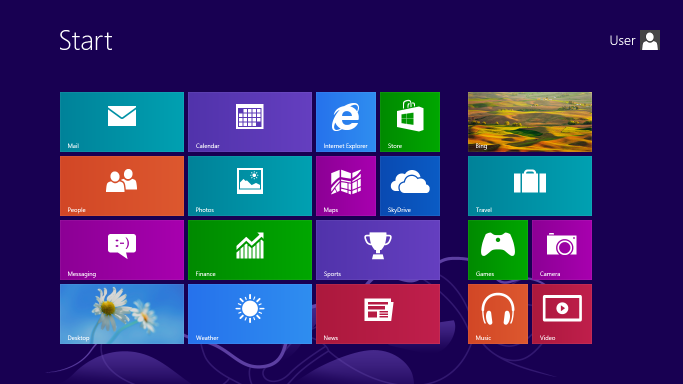
The Metro interface looks colourful and feels easy on the hardware. Scrolling between apps is remarkably smooth, and whilst Metro takes time to adapt to, it's not overly time-consuming. App searching works similarly to Win7, which helps with the transition.
The invisible corner buttons was a bit useless, honestly. Live Tiles are decent, though I find it strange how they auto-update and consume my limited data allowance! 😕
Explorer Changes: Mostly identical to Win7 with subtle tweaks. The updated top menu bar feels odd, you can't access important functions directly anymore. It's now: select this, then that, then finally open what you wanted. The characteristic Windows menu bar has vanished, and adapting takes genuine effort.
The Winner: Copy-Paste Dialog The new copy-paste interface is definitely superior! Windows finally includes a pause button, and the cancel button becomes a proper close icon (×). Might not need Teracopy anymore! 😄
Network file sharing worked seamlessly, connected effortlessly between my Windows XP and 7 machines.
Laptop experience: the harsh reality
Completely different story on my laptop. Metro UI was genuinely disappointing here. Microsoft seems to have completely forgotten about traditional laptop trackpads. Scrolling between apps becomes annoying, user switching is clunky, and the OS demands customisation before becoming usable, unlike Win XP or Win7 where you could start working immediately out of the box.
Surprise winner: Full-screen IE browsing! Definitely gets a thumbs up.
The OS worked without needing additional drivers, which was refreshing. My laptop was particularly troublesome with fresh Win7 installations (WiFi and sound drivers never cooperated), so this was a pleasant change.
The interface philosophy disconnect
What strikes me most about Windows 8 is the design philosophy confusion. On desktops, Metro feels like a compromise, functional but not optimal. On laptops without touch screens, it feels like using software designed for entirely different hardware.
The interface assumes touch interaction at its core, yet most of us are still using mice and keyboards. It's like Microsoft designed a beautiful sports car but forgot that most roads aren't racetracks.
Bottom line
Windows 8 doesn't feel packed with substantial upgrades beyond the new UI. It's essentially Win7 optimised here and there for different form factors. Most office environments are still stuck on Win XP, with transitions to Win7 taking months longer than expected.
The October 26th release date felt a bit premature to me, but then Upgrading from Win7 to full release 8 feels like spending significant money on what amounts to a visual upgrade with questionable usability improvements for traditional computing setups.
Cheers! :)